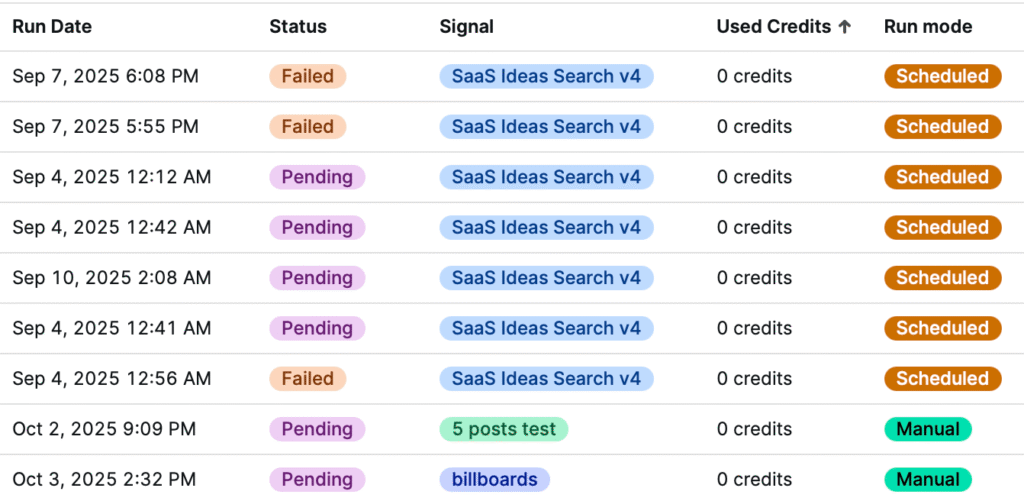
If your Signal isn’t collecting any posts, don’t worry—this usually means there’s a simple fix. ThreadSignals is designed to pull high-quality, recent discussions, but a few settings can limit what’s found.
Below are the most common reasons a Signal may return zero results and what you can do to resolve them.
1. Your Keywords Are Too Specific
ThreadSignals searches for recent posts (typically within the last 24–72 hours) to keep your leads relevant. If your keywords are too niche or too long, there may not be enough recent discussions that match exactly.
How to fix it:
Try simplifying your keywords (e.g., change “affordable web design for startups” to “web design help”).
Add 1–2 more keywords to increase your chances of finding matches.
Remember: the longer the keyword, the fewer exact matches ThreadSignals can detect.
2. Your Keywords Aren’t Used in the Groups You Selected
If your chosen groups (subreddits) rarely discuss your keywords, ThreadSignals won’t find relevant posts.
How to fix it:
Review your group selections and add or swap out groups with more activity.
For example, searching for “SEO help” in a local group like Denver will only return results if users there actually mention that term.
Use a mix of broad and niche groups to improve coverage.
3. Your Signal Doesn’t Have Enough Credits
Signals can’t run if your available credits are below the number you set as your max credits per run.
How to fix it:
Check your credit balance in the bottom-right corner of your dashboard.
Either lower your max credits for that Signal or purchase an additional credit pack to replenish your balance.
4. Your Signal Is Paused
Scheduled Signals will not run while paused. If you recently paused it, it will stay inactive until you resume it manually.
How to fix it:
Go to your Signals page and click Resume to reactivate the Signal.
You can also manually run it by pressing Run if it’s not on a schedule.
5. You’re Using Long-Tail or Low-Activity Keywords
ThreadSignals prioritizes recency and relevance. If a keyword hasn’t appeared in posts recently, it may show 0 results for that run.
How to fix it:
Try running the Signal again later, as new discussions are constantly being created.
Consider shortening or rewording the keyword to capture more variations.
6. Double-Check Your Run History
If you’re unsure whether your Signal ran successfully, visit your Run History page. If you see the Signal listed with 0 credits used, that means it ran but found no posts.
Pro Tip
When in doubt, broaden your keywords or add a few more to a new Signal. It’s often better to start wider and refine over time than to miss posts due to over-specific targeting.