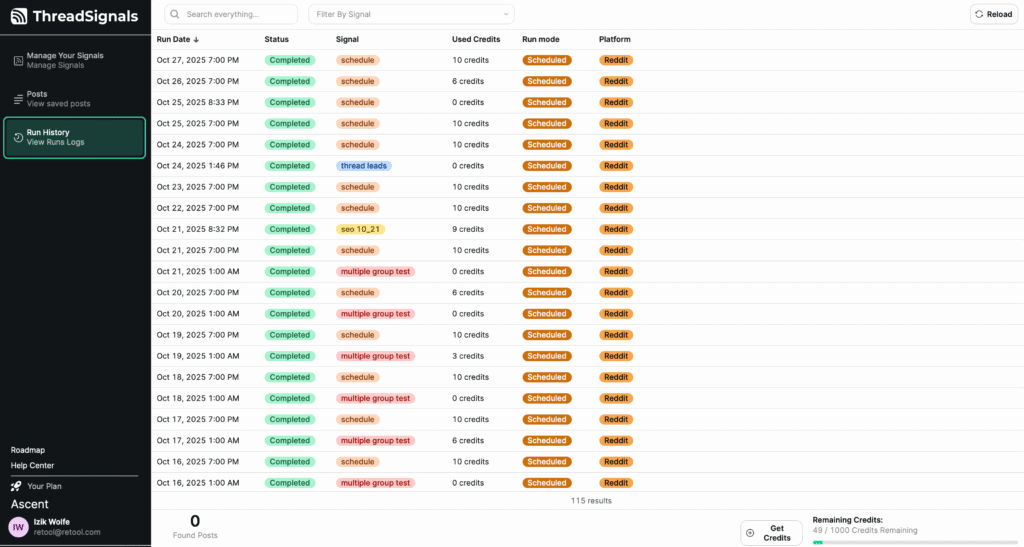
Your Run History doesn’t just show when Signals ran—it helps you understand how well each Signal is performingand how efficiently your credits are being used.
By reviewing each column and identifying trends, you can fine-tune your keywords, groups, and credit settings for better results over time.
1. Understanding Run Results
Each run entry provides insights into how your Signals are performing:
Completed Runs – These indicate that your Signal successfully executed and retrieved posts.
Used Credits – Shows how many credits were consumed during the run. If the Signal didn’t find enough posts to meet its max limit, it only used credits for the number of posts retrieved.
Run Mode – Helps identify whether the run was triggered manually or as part of an automatic schedule.
By tracking these metrics, you can see which Signals are actively finding leads and which ones may need adjustment.
2. Spotting Patterns and Optimizing Performance
Use your Run History to recognize trends such as:
High-performing Signals that consistently find posts and use all allotted credits.
Low-activity Signals that rarely find posts, suggesting keywords or groups may need updating.
Credit efficiency, showing whether your credit usage aligns with your results.
These insights help ensure you’re focusing your credits on Signals that deliver the best returns.
3. Troubleshooting Missed Runs
If a run shows fewer posts than expected or doesn’t complete, it may be due to:
Insufficient credits at the time of the run.
No recent posts matching your keywords or groups.
The Signal being paused before completion.
Keywords are too specific or niche.
You can adjust your Signal’s keywords, max credits, or schedule to improve future results.
4. Reviewing Trends Over Time
Your Run History makes it easy to identify which Signals are driving consistent results and when your account activity peaks.
You can sort columns—for example, by Run Date to see your most recent runs, or by Used Credits to spot Signals consuming the most activity. Combining this with the search bar lets you quickly locate patterns across specific Signals or time periods.
This makes the Run History page a great tool for tracking performance trends and understanding how your Signals evolve over time.
Pro Tip
Make it a habit to review your Run History weekly. If you notice Signals with repeated low post counts, try adjusting your keywords or expanding to new groups to increase your reach and lead flow.