Hey there, need some help?
Hey there, need some help?
Hey there, need some help?
Help Center › Billing & Account › Troubleshooting Payment Issues
Troubleshooting Payment Issues
If you’re having trouble completing a payment, updating your billing method, or renewing your subscription, don’t worry—most payment issues are easy to resolve.
This guide walks you through the most common causes and how to fix them quickly so you can get back to using ThreadSignals without interruption.
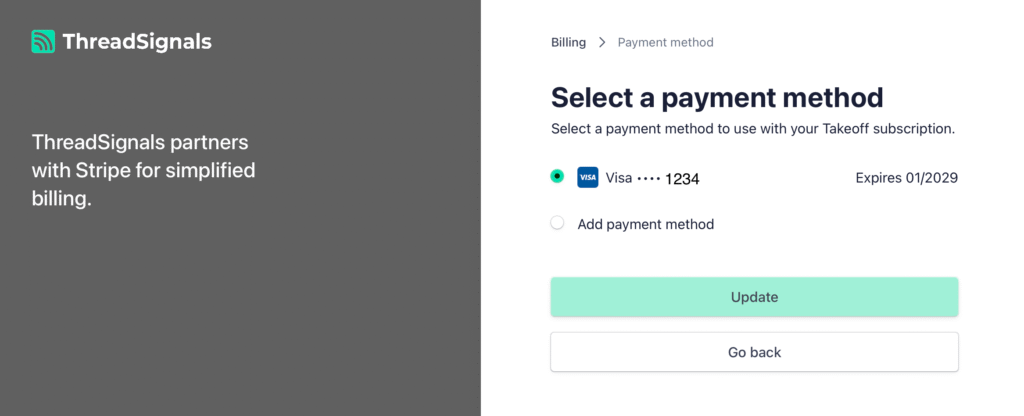
1. Payment Failed or Was Declined
If your payment was declined, it’s typically due to one of the following reasons:
The card on file has expired or was replaced.
There are insufficient funds in your account.
Your bank blocked the transaction for security reasons.
The card’s billing address doesn’t match the one on file.
How to fix it:
Click your profile picture in the bottom-left corner of your dashboard.
Select “Manage My Billing” to open your Stripe billing portal.
Add a new payment method or update your existing one under Payment Methods.
Make sure your billing address matches your card’s details exactly.
If the payment still fails, contact your bank to confirm that online or recurring payments to Stripe are allowed.
2. Billing Didn’t Update After Payment
If you successfully updated your plan or payment but your dashboard still shows the old plan or credits, it’s usually just a brief syncing delay.
How to fix it:
Wait a few minutes and refresh your dashboard.
Log out and back in to force a new sync.
If the issue persists after 10–15 minutes, contact support at support@trythreadsignals.com for verification.
Your plan and credits typically update within minutes of Stripe confirming payment.
3. Double Charges or Incorrect Billing
If you see duplicate charges or believe you were billed incorrectly:
Verify in your Stripe billing portal that you only have one active subscription.
Check your bank statement for the specific charge dates.
Contact our team at support@trythreadsignals.com with the charge amount, date, and last four digits of your card.
Our team will review the transaction and issue a refund or correction if necessary.
4. Expired or Invalid Card on File
If your card has expired, future renewals will fail automatically.
How to fix it:
Go to your Stripe billing portal through Manage My Billing.
Add your new card and click Set as Default.
Delete the expired card from your list to prevent future issues.
Stripe will automatically retry failed renewals once a valid payment method is added.
5. Still Having Payment Problems?
If you’ve checked all of the above and are still experiencing issues, you can:
Reach out to support@trythreadsignals.com with your account email and a short description of the issue.
Include any error messages or screenshots if possible.
Our team will investigate the issue promptly and follow up with a resolution or next steps.
Pro Tip
Most payment errors come from expired cards or bank verification blocks.
Keeping your payment method current and ensuring your bank recognizes Stripe as a safe vendor will prevent most future billing interruptions.