If you’re having trouble logging in or resetting your password, don’t worry—ThreadSignals provides two simple ways to regain access to your account.
You can reset your password directly from the login screen if you’ve forgotten it, or from your dashboard settings if you’re already logged in and want to change it manually.
1. Forgot Password (Can’t Log In)
If you’ve forgotten your password and can’t log in, follow these steps:
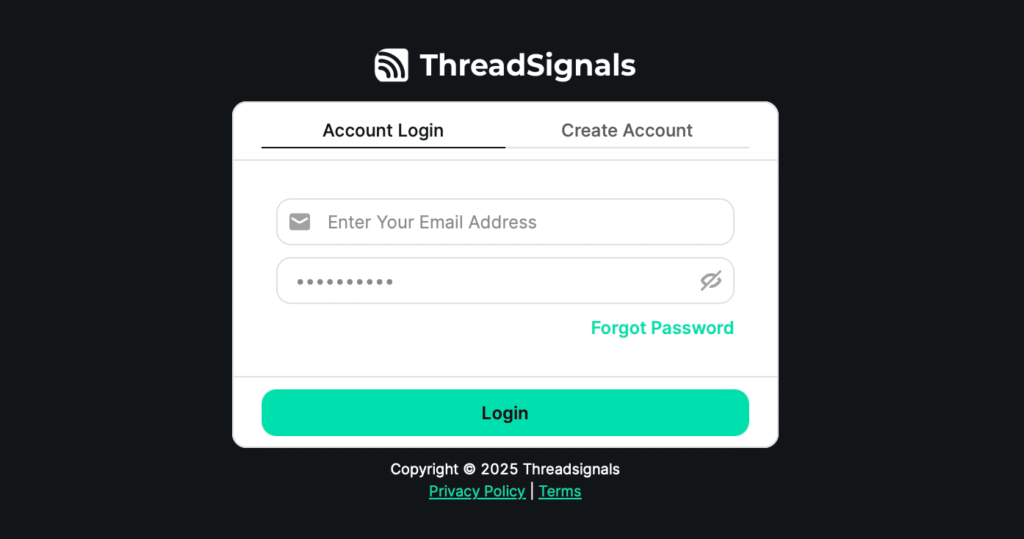
Go to the ThreadSignals login page.
Click “Forgot Password?” below the login fields.
Enter your account email address and click Send OTP.
Open the inbox for the email associated with your account—you’ll receive a one-time passcode (OTP).
Copy the OTP and enter it on the reset page.
Once verified, you’ll be prompted to create a new password.
After that, you’ll regain access to your account immediately.
2. Reset Password Within Your Dashboard
If you’re already logged in and simply want to update your password, you can do it right inside your account settings.
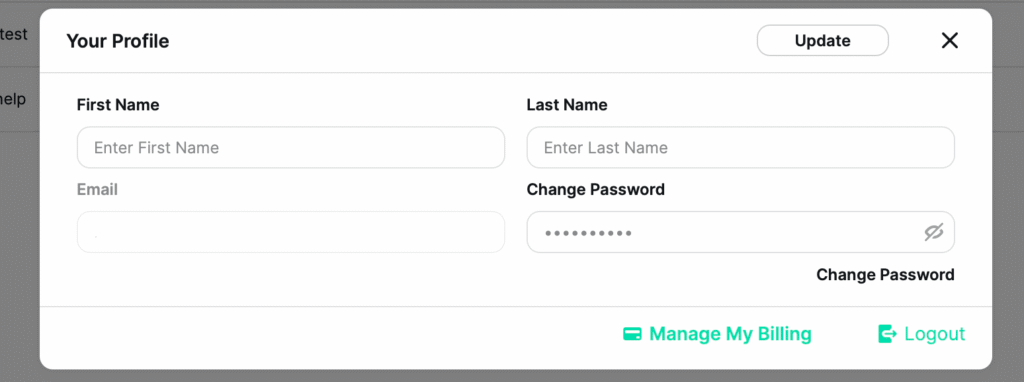
Click your user profile in the bottom-left corner of your dashboard — this opens your Account Settings.
Scroll to the Change Password field and enter your new password.
Click Change Password to confirm the update.
Finally, click Update in the top-right corner of your Account Settings to save your changes.
Your new password will take effect immediately—no need to log out or reverify your email.
3. Common Login Problems
If you still can’t log in after resetting your password, try the following quick fixes:
Double-check that you’re entering the correct email address associated with your account.
Clear your browser cache or try a different browser.
Make sure your OTP hasn’t expired (codes are time-sensitive).
Use a strong password that includes at least one uppercase letter, one number, and one special character. This keeps your account secure while preventing password reset issues in the future.