Managing your ThreadSignals account and billing details is quick and easy.
You can update your personal information, change your password, or view your billing information directly from your dashboard. All account settings are accessible in just a few clicks.
1. Accessing Your Account Settings
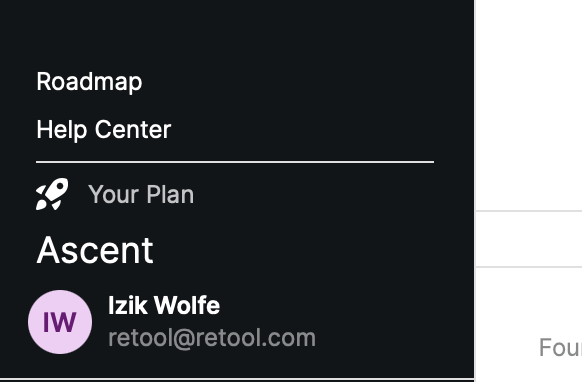
Click your profile picture in the bottom-left corner of your dashboard, next to your username and plan type.
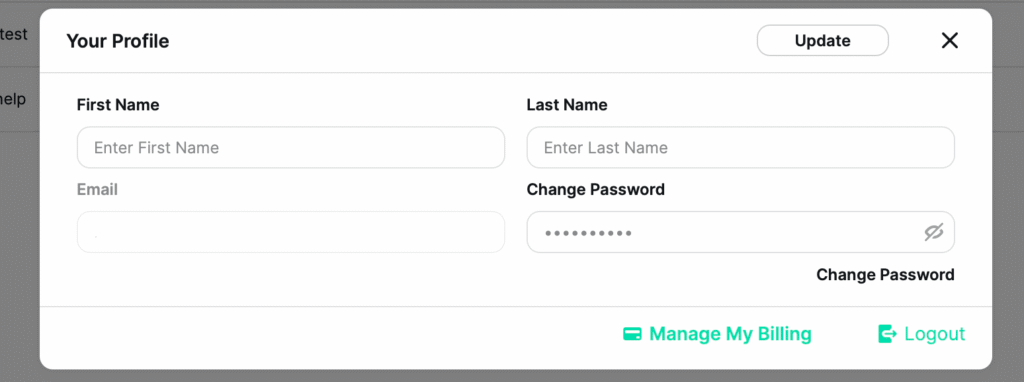
This opens your Account Settings window.
Here, you can:
Edit your first name and last name.
View your current email address.
Change your password using the “Change Password” field.
All changes you make here take effect immediately after clicking Update in the top-right corner of the window.
2. Managing Your Billing
At the bottom of the Account Settings popup—next to the Logout button—you’ll see an option labeled “Manage My Billing.” Clicking this button takes you directly to Stripe, where you can securely view and manage:
Your active subscription plan
Payment methods on file
Billing history and invoices
Stripe is our official payment processor, ensuring your billing information is always protected and easy to update.
Pro Tip
If you ever need to update your payment method or switch to a different plan, you can do it directly in Stripe—no need to contact support.
Your changes will automatically sync with your ThreadSignals account within minutes.