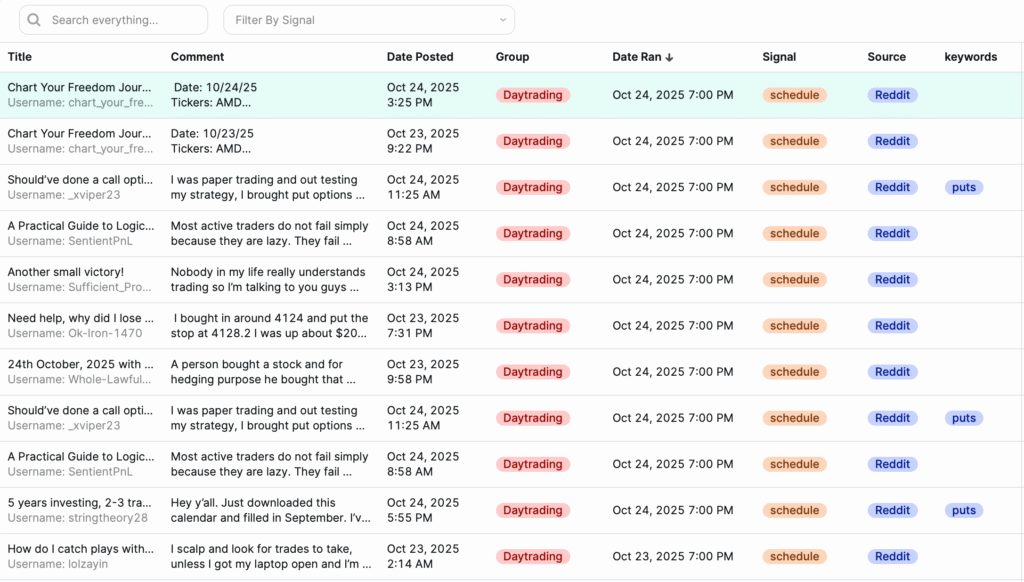
Each post ThreadSignals collects includes detailed information organized into columns.
These columns help you understand where the post came from, what triggered it, and which Signal found it, so you can decide which leads are worth engaging with.
Post Columns Explained
1. Title
The title of the post as it appears on Reddit (or any other source). This gives you an instant snapshot of what the discussion is about.
2. Comment
A short preview of the post content or comment. Click “View Comment” to open the full text directly within your dashboard.
Inside the full view, matching keywords are automatically highlighted, helping you see why the post was collected.
3. Date Posted
The date and time when the original post or comment was published on Reddit. This helps you identify how recent the discussion is.
4. Group
The subreddit (or group) where the post was found. Each group represents a specific audience or topic community, which is key for targeting relevant conversations.
5. Date Ran
The exact date and time your Signal last ran and found the post. This allows you to track how current your data is and see which runs are generating results.
6. Signal
Displays the name of the Signal that discovered this post. This is helpful if you’re running multiple Signals across different audiences or services.
7. Source
Shows the platform where the post was found.
Currently, all posts come from Reddit, but this column will eventually include future platforms like Quora or others as ThreadSignals expands.
8. Keywords
Lists the keyword or phrase that triggered this post. This tells you exactly what term matched and why it appeared in your results.
Using the Columns Effectively
You can click any column header to sort your posts and use the search bar to find results that match specific titles, groups, or keywords.
This makes it simple to prioritize newer posts, focus on specific Signals, or spot high-intent conversations quickly.
Pro Tip
The Signal and Keyword columns are your best friends when qualifying leads. They show exactly what you were tracking—and what your audience is asking for—so you can target your outreach with precision.