Every time one of your Signals runs, ThreadSignals gathers matching posts and displays them in the Posts section of your dashboard.
This is where you can view, sort, and analyze all of your collected posts in one place.
Accessing Your Collected Posts
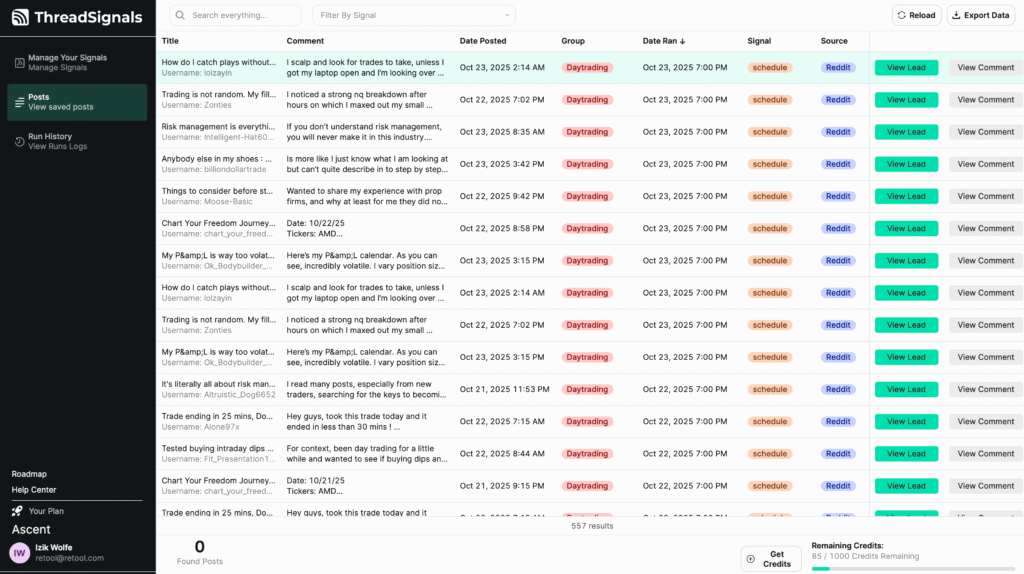
To view your collected posts, click the Posts tab from the left-hand menu. Here, you’ll see every post that’s been captured from your Signals—whether they were run manually or on schedule.
Each new run automatically adds fresh posts to this list.
Post Details
Each post entry includes key information across several columns to help you review and manage your results efficiently.
Here’s what each column displays:
Title – The title of the original post.
Comment – A preview of the post text. Click “View Comment” to open the full post directly within your dashboard. When opened, your matching keywords are automatically highlighted so you can quickly see what triggered the match.
Date Posted – The date and time the post was originally published.
Group – The subreddit or community where the post was found.
Date Ran – The date and time your Signal collected the post.
Signal – The name of the Signal that found this post.
Source – The platform where the post was discovered (currently Reddit).
Keywords – The specific keyword or phrase that matched within the post.
You can also use the search bar at the top to find posts by keyword, group, or Signal name. Next to it, the Filter by Signal dropdown lets you narrow results to posts collected by a specific Signal.
Real-Time Organization
Collected posts automatically stay tied to the Signal that found them, even if that Signal is later deleted. This ensures you never lose valuable lead data.
You can still view, search, and filter all posts regardless of which Signal originally captured them.
Pro Tip
If you see a post that looks like a strong lead, click its title to view it in full context and decide whether to reply directly or save it for later outreach.